Not mock-ups. A real customer's website, a real invoice from the app, and a demo account you can log into right now.
These are example sites, scroll them. Three looks. Pick the one that suits you, then pick your colour and the whole site follows it: buttons, headings, the accents on your invoices. Every site comes with your own domain, call and WhatsApp buttons, your services, your area, your photos, and the bits Google needs to find you.
Bold and punchy. Big headline, your credentials scrolling across the page, numbered services and a phone number big enough to tap from the van. Plumbers, electricians, roofers, builders.
See the example →Warm and friendly. Elegant lettering, your photo in an arch, soft colours and a simple price list. Cleaners, gardeners, tutors, removals, anything home-based.
See the example →Glossy, magazine-style. Fashion lettering, your work in a framed portfolio, a menu of treatments and WhatsApp booking. Hair, beauty, nails, lashes, brows.
See the example →Got a logo already? We match the colour to it.
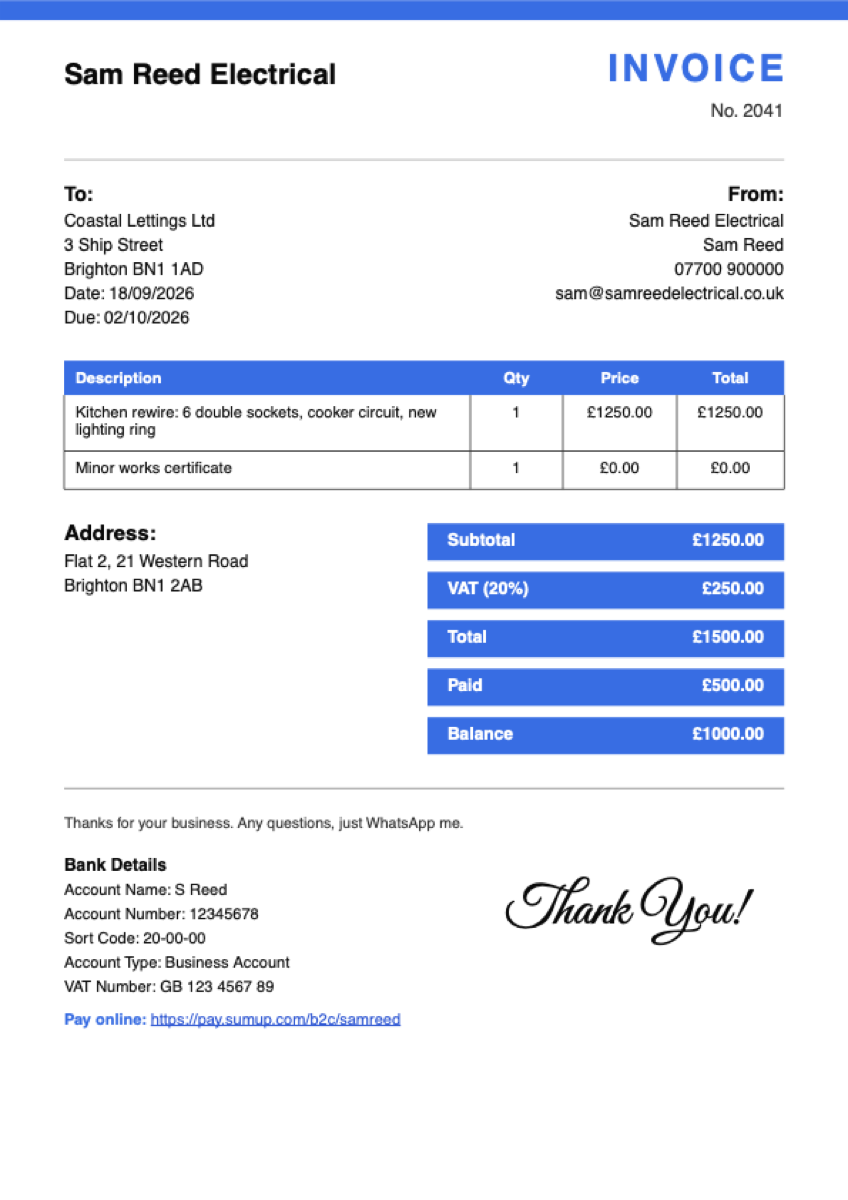
Your logo, your colour, your bank details, a pay-online link and a VAT breakdown if you're registered. Made on your phone in about a minute and sent to the customer's WhatsApp as a PDF.
Quotes look the same. When the customer says yes, one tap turns the quote into the invoice, numbering continues from wherever your pad left off, and deposits and part payments come off the balance.
Open the app on your phone, log in with the demo details, and have a go. Make a quote, turn it into an invoice, mark it paid.
App: app.pocketpaperwork.com
Mobile: 07700 900000
PIN: 1234
Money owed to you, what's overdue, quotes waiting for a yes, what came in this month, and your receipts. The overdue invoice has a one-tap WhatsApp reminder with the amount and pay link already written.
The demo resets now and then, so don't put anything real in it.
Tap Snap a receipt, take the photo, and the app reads the shop, the date, the total and the VAT, picks a category and fills the form in. You check it and save. About ten seconds, in the van, before the receipt gets lost.
Every receipt is kept with its photo, totalled by month, and goes to your accountant as a CSV alongside your invoices and payments. That's the digital record HMRC's Making Tax Digital rules ask for, without a shoebox.
Log into the demo below on your phone, open Expenses, tap Snap a receipt and point it at anything with a total on it. Up to 150 receipts a month are read automatically; after that the photo still saves and you type the total.
The camera opens on a phone. On a computer the same button opens your files.
Two files, one tap each, any time you ask: every invoice (number, date, due date, customer, net, VAT, total, deposit, paid, balance, status) and every payment (date, invoice, amount, method). Dated, numbered, no gaps, no shoebox.
Sample invoices.csv Sample payments.csv
Digital records, exported for you or for bridging software. We don't submit to HMRC and we don't call ourselves MTD software.
 Pocket